CASE STUDY
Leaning on Claude to make 120+ plant profiles easier to navigate
Redesigning the guide menu for a native plant encyclopedia, with Claude as a design and build partner.
ROLE
UX Designer (Contract)
FOCUS
AI-assisted design · Information architecture · Navigation
TOOLS
Claude ·Claude Design · Wordpress · Loom
STATUS
In Progress. Designed, prototyped, tested, and now in staging
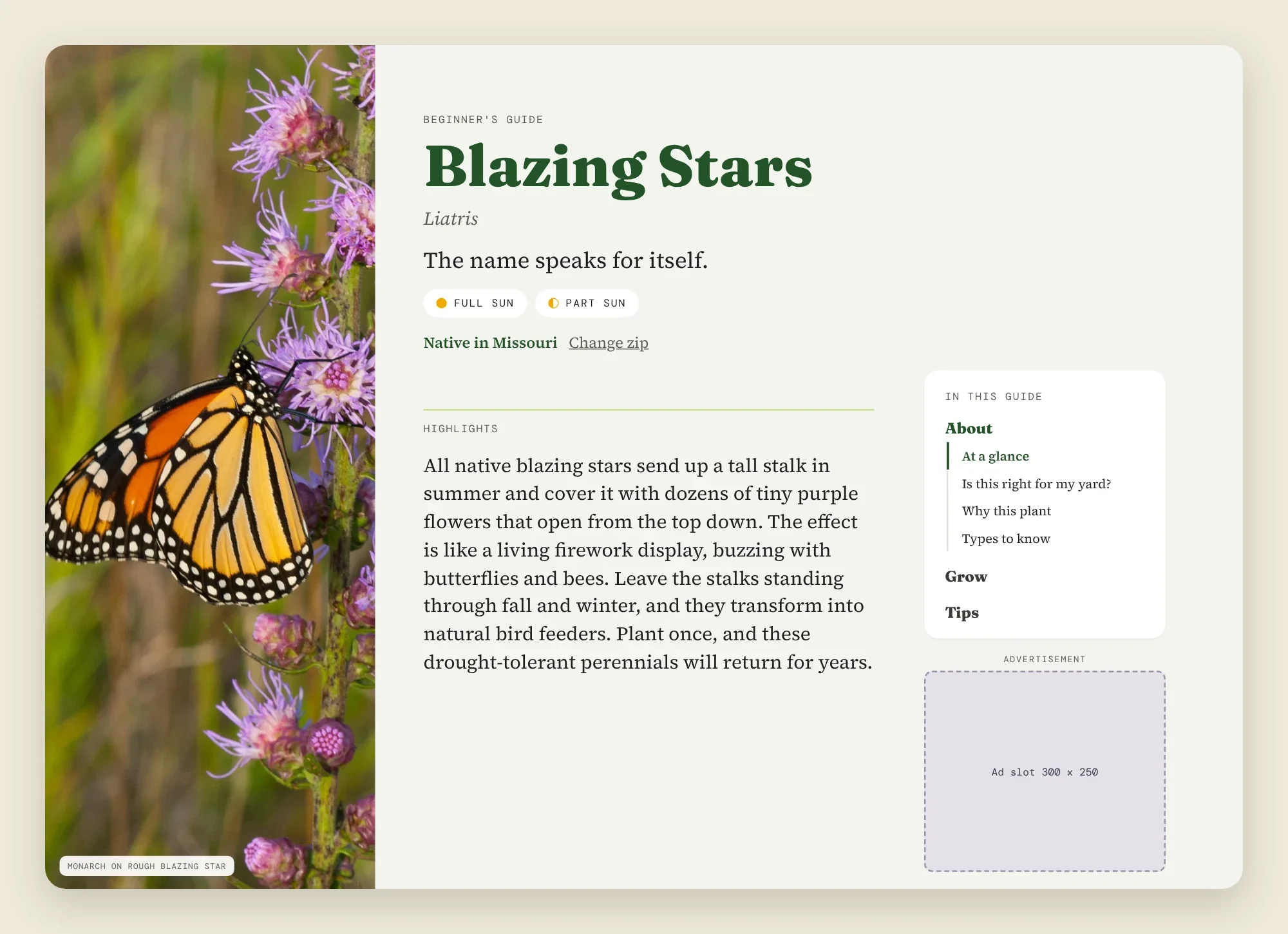
A pinned guide menu beside the content on desktop, with the ad slot below it.
THE CONTEXT
Getting lost in the ‘weeds’
While building out plant profile pages for an online native plant encyclopedia, I noticed how easy it was to get lost in them. I was hired as a contractor for the site, helping to build out these plant profiles as the site prepares for an overhaul, and focuses on growing the brand.
The pages are packed with information, bringing readers face to face with a long wall of information that’s easy to get lost in. An existing sidebar menu scrolls away as you read, making it hard for readers to know where they are on the page, or easily find the information they are looking for. The existing menu was also built around SEO headings, rather than around how people look for things.
I proposed a new guide menu that chunks the information, stays in view, works on desktop and phone, and doesn’t interfere with the ads already in the sidebar.
The menu was built for search engines. I wanted it to help readers too.
TEAM DYNAMIC
UX Designer (Contract)
As a contractor, I joined a team of creators, designers and marketers with deep expertise in SEO and AIO. Much of the site was built on this expertise, but the team was open and excited about improving usability. I made the sugesstions, and provided the reasoning, initial testing, and tools (Claude prompt) to accomplish the work, and the editor does the official roll out in WordPress, and holds the final decision on what is standardized.
I used Claude Design for prototype creation, then Claude Code to support the editor with implementation.
WHAT I OWNED
Structure: I reviewed several pages, listed every section I found, and picked the headings that gave the most flexibility, grouping the information into them into three buckets: About, Grow and Tips.
Direction: I described what I wanted to Claude, shared a screenshot of the Blazing Stars page for the branding and context, and chose between the options it laid out
Feedback: I recorded Loom walkthroughs of the options for my team and gathered their feedback before finalizing the design and direction.
Interaction design: Explored and iterated on how a user accesses subsections on mobile, landing on tapping a group to open the menu.
Scope calls: I looked for ways to simplify the design so that the workload to implement stayed manageable.
Heading updates: I’m proposing updates to some subheaders so each page can use the same menu.
WHAT CLAUDE DID
Read an existing plant page to get the starting sections.
Built clickable mockups in Claude Design.
Wrote the code for a drop-in test version and tested it in a browser.
Wrote a prompt the editor can give her own Claude to build it in WordPress.
On phones, a bar of three buttons stays pinned at the top. Tapping one opens that group’s links.
THE UX FRICTION
The challenges
01
Different headings on every page
THE FRICTION
Pages on the site don’t share the same sections. Some pages have a section that others lack.
THE SOLUTION
I kept the menu labels fixed and linked each one to a standard anchor ID. If a page has no heading with that ID, the link hides.
02
A menu that doesn’t crowd the ads
THE FRICTION
The sidebar already holds ads. A pinned menu with eleven links would take over the column.
THE SOLUTION
Grouping the links into three buckets, with only the group you are reading open on desktop. On phones, a single bar of three buttons stays at the top, and the list closes after a tap.
03
Prioritizing the core flow
THE FRICTION
I had asked Claude for the phone bar to sit below the Highlights section. That added extra containers to every page.
THE SOLUTION
I put it back at the top of the screen. Then I had Claude build a test version that works on any theme, and a handoff prompt for the editor.
04
Keeping it simple for the person building it
THE SOLUTION
The menu uses intuitive language links, and all page content stays in the page itself so search engines still see it. We will continue to monitor organic traffic during the rollout.
THE FRICTION
The old menu was SEO-driven, and the editor’s main concern was keeping search performance.
✨ AI AS A DESIGN PARTNER
How I checked Claude’s work
I tested like a user. Links jumped to the wrong spot, and headings hid behind the pinned bar. Claude traced the first problem to the design canvas, which draws pages as static frames. When it tested its own code in a browser, it found a bug in the first version: the sidebar never switched groups. I also rejected parts of its first draft: lists that stayed open after a tap, and no ad slot.
NEXT STEPS & PROJECT IMPACT
Still in progress….
This project is in progress. The editor is rolling the menu out to a small batch of pages using the prompt we wrote, and I’m refining it as she tests.
Once it’s live, we’ll be tracking:
engagement on plant pages and clicks on the menu,
organic search traffic,
ad performance, to ensure the pinned menu doesn’t cost the site revenue.