CASE STUDY
Shipping the StreetSmart MVP.
Synthesizing legacy research into an actionable baseline, establishing the team's agile product workflow, and prototyping the core user flow using AI design tools as a collaborative partner.
ROLE
Product & UX Lead
FOCUS
Prototyping · Research · Pilot coordination
TOOLS
Figma · Trello · Loom · Magic Patterns
STATUS
Pilot in active development
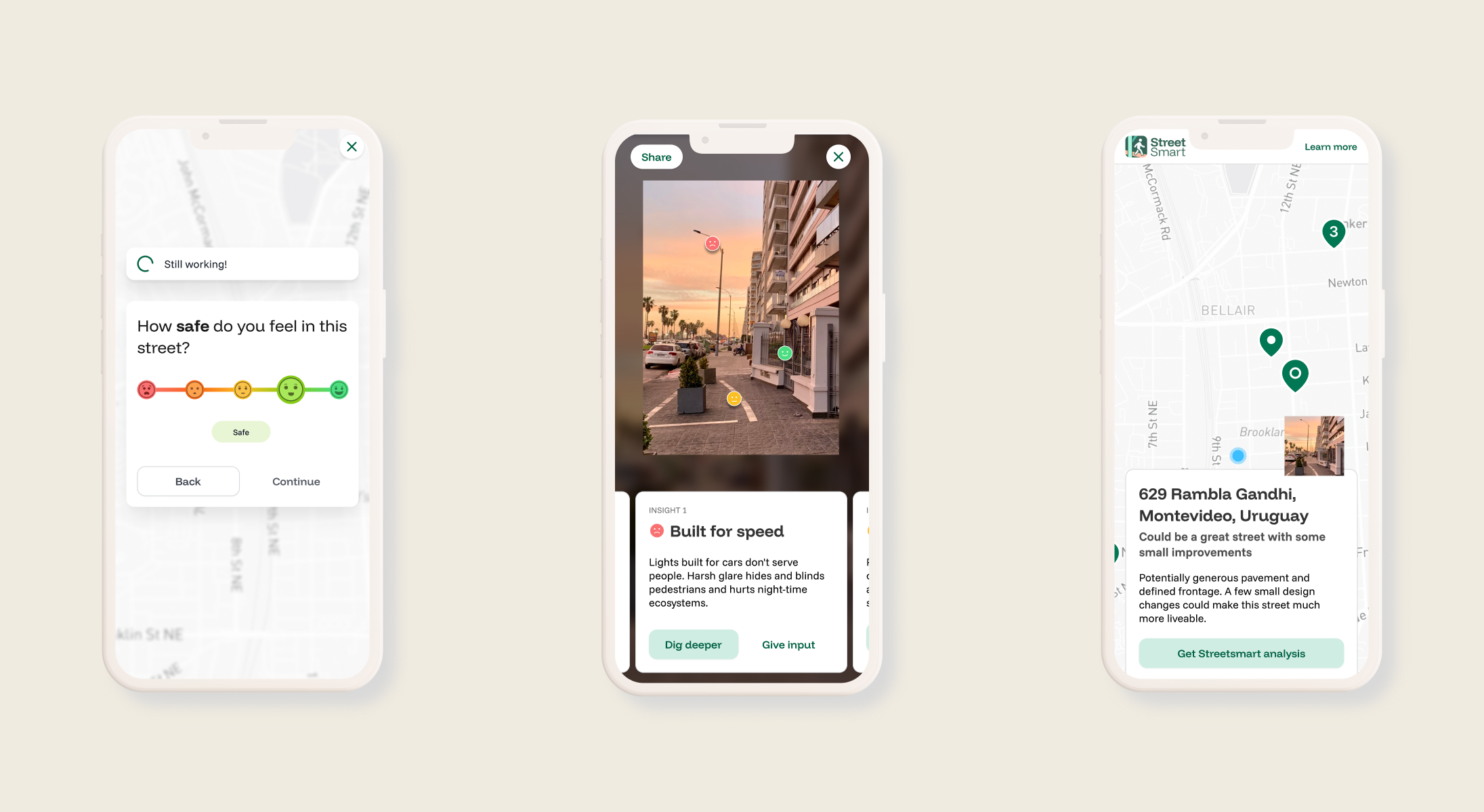
Users share their experience, then see an AI analysis of their street.
THE CONTEXT
About StreetSmart
StreetSmart is a collaborative street audit platform that makes the human experience of streets measurable, combining street photos, participant input and AI-assisted analysis into decision-ready evidence for healthier, safer and more climate-resilient streets.
StreetSmart is founded by Reena Mahajan, www.livestreetsmart.com.
Initial dashboard concept, combining subjective insights with automated data to help city planners identify challenges.
AI DETECTIONS
Objective, automated data pulled from user photos identifying infrastructure like street furniture, narrow pavements, or overgrown vegetation.
USER PERCEPTIONS
Subjective, human data gathered through multiple-choice questions, sliders, and voice notes capturing how safe or comfortable a person actually feels on a given street.
A street might look structurally sound to an AI but feel unsafe to a woman walking alone at night. Pairing these insights gives cities actionable, people-centered data for targeted renovations.
TEAM DYNAMIC
Product and UX Lead
As the Product & UX Lead for a multidisciplinary team within Climatebase Cohort 9, I owned the transition from raw user data to a production-ready interface on a tight timeline, focusing on the primary user-input flow, prototyping, research synthesis, and custom graphics.
Alongside owning the design and research synthesis, I established and maintained an agile workflow, structuring the product pipeline into a Trello Kanban board to align stakeholders, bridge the gap between design and engineering, and accelerate feature delivery.
Four interaction models for the user-input flow, built quickly in Magic Patterns to help the team make a fast decision for hand off to engineering.
WHAT I OWNED
Timeline ownership: Managed the end-to-end design schedule to ensure all UI deliverables were ready for the development team handoff.
High-velocity prototyping: Used generative AI tools (Magic Patterns) to quickly build and iterate on user flows, testing layout ideas like slider mechanics versus multiple-choice options.
Agile leadership: Organized the product pipeline into a Trello Kanban board to bridge the gap between design and engineering. This minimized friction for onboarding new developers, allowing them to immediately pick up tasks and accelerating feature delivery.
Stakeholder Management and Cross-functional collaboration: Partnered closely with the project’s Founder and the team's Behavioral Scientist to finalize the phrasing and logic for the user-input questions.
Design system styling: Established the final app color palette and applied it across all new slider components, interactive elements, and custom graphics.
Research synthesis: Organized a fragmented archive of legacy notes from past cohorts into a clear framework to get the incoming team aligned.
Scope Management: Kept the immediate launch timeline on track by pushing the complex dashboard build out of the current sprint, supporting the team on producing a single mockup for the demo instead.
THE UX FRICTION
The challenges
01
Synthesizing Legacy Research
THE FRICTION
An unanalyzed archive of research from past cohorts meant that the previous user testing insights were unaccessible, putting the new team at risk of building blindly without this valuable feedback.
THE SOLUTION
I grouped the old research findings into one clear presentation giving the team a set of solid insights to inform our build and saving us from repeating the work.
02
Balancing velocity and collaboration
THE FRICTION
Designing quickly in high-fidelity tools let me meet our tight pilot deadlines, but moving that fast meant I was accidentally leaving some of my teammates behind.
THE SOLUTION
To fix the communication gap, I changed how I shared my work, using our team calls to walk through the interface layout step by step and making sure everyone was on the same page and involved in our final MVP decisions.
03
Prioritizing the core flow
THE SOLUTION
I focused our design work on what we needed to ship right away, working with our behavioral scientist to lock down the language for the input flow. I also quickly built four layout options so the team could make decisions fast and hand off the final designs to the development team.
THE FRICTION
A sudden gap in engineering capacity meant we needed to pivot and reprioritize the sprint. We had to push the complex dashboard to a future phase, leaving us to focus on fixing the main user-input screens on a tight deadline.
✨ AI AS A DESIGN PARTNER
AI as a high-velocity collaborator.
I used generative AI design tools to quickly turn abstract ideas into layout options for generating fast feedback, treating it as an execution partner rather than a replacement for design thinking.
Data synthesis: Used language models to comb through an archive of legacy research notes, extracting the core insights.
Rapid layout ideation: Used Magic Patterns to brainstorm layout variations and build four interaction mockups, enabling the team to prioritize options and make quick decisions.
Requirements integration: Leveraged AI to map out minimum data requirements and explore how to incorporate complex dashboard elements without blowing out the MVP scope.
Research & pattern support: Utilized AI to investigate mobile UI patterns and best practices for data collection, speeding up the interaction design phase.
NEXT STEPS & PROJECT IMPACT
Building the Foundation for Launch
This project is in active development ahead of its pilot launch August 2026, so public user metrics are not available yet. The rapid design sprint got the team moving fast, delivering momentum right when the project needed it.
IMPACT 01
Focused MVP scope
By shifting from abstract, long-term concepts to strict MVP prioritization, I kept the design sprint moving despite a shrinking team. AI prototyping let me map out the core interaction mechanics and deliver user flows to engineering without dropping momentum.
IMPACT 02
Stakeholder readiness
Finalizing the high-fidelity dashboard prototype in Magic Patterns gave the team a functional model to present during fundraising efforts, keeping our go-to-market momentum intact despite backend technical delays.
IMPACT 03
Future roadmap
With the baseline research synthesized and MVP core features locked in, the team now has a clear blueprint for the next release cycle, focused on live data integration and initial user testing with municipal partners.
IMPACT 04
Operational Velocity
Established the team's first agile framework by structuring the product pipeline into a Trello Kanban board, bridged the gap between design and engineering.